You can downoad this my unusual spiral calendar for 2027 as a
PDF file for printing !!!
You can download a PDF file with
14 small calendars on one page for 2027 (2 pages - English and Bulgarian variants)!
Below on the page you will find many variants of FLAT RECTANGULAR PERPETUAL
CALENDARS
with movable components. They are easily prepared in Excel.
Every such calendar can be converted to CONICAL, CYLINDRICAL, PRISMATIC,
or FLAT CIRCULAR one.
(2025)
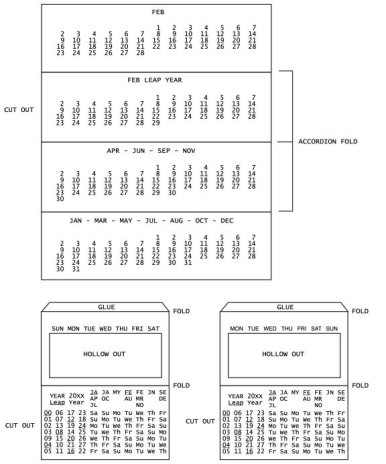
ORIGAMI APPROACH TO TRIANGULAR PRISM CALENDARS
HORIZONTAL PRISM:
A table with 4 rows and 2 columns (4x2), containing 8 equal rectangles, can be easily folded to show a single one of the rectangles as the front face.
Choosing which element to be shown, simply fold along the middle vertical line and hide the unused 4x1 strip under the strip with the chosen element. Then insert one of the ends into the slot at the other end as shown on the picture.
VERTICAL PRISM:
Use a table with 2 rows and 4 columns (2x4). Fold horizontally along the long middle line and insert one of the ends into the slot at the other end.
Note that, for any matrix with the one dimension at least 4 and the other at least 3 the same approach can be used.
As an example, EVERY STANDARD YEARLY CALENDAR 4x3 or 3x4 can be folded, hiding the two unused horizontal or vertical strips. Then proceed as above.
I also prepared prismatic month calendars with dimension more than 4 elements in one direction.
The files
Prisms EN - PDF
and
Prisms BG - PDF
(left picture above)
contain two calendar variants (5x2 and 2x5) with a table for the period 1916-2099. It indicates the Day of the Week for the Date 1st of the Month.
Cut vertically in the middle. Choose the left or the right part. Fold together two of the unused end elements to make a 4x2 or 2x4 matrix. Continue as above.
The vertical prism could be also quadrangular as the picture shows. In addition this allows convenient flat folding.
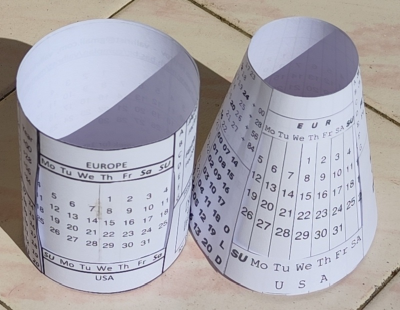
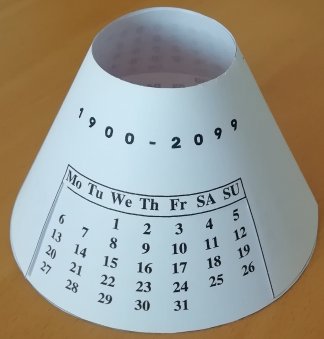
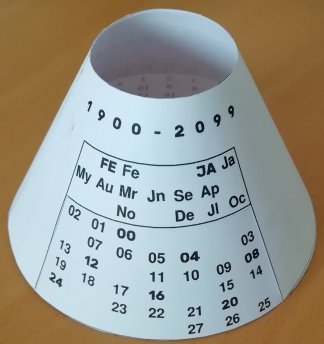
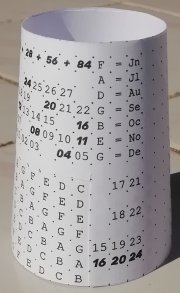
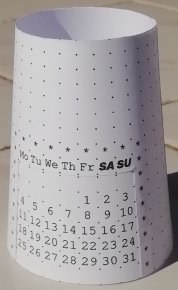
Find the Day of Week of the First Date of the Month using the table on the outer cylinder or cone (leap components are BOLD ITALIC RED).
Telmo suggested to add a helpful visual instruction for the conical variant.
(Instruction in Bulgarian - PDF)
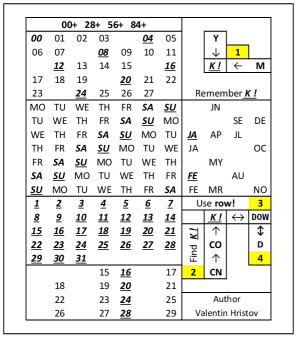
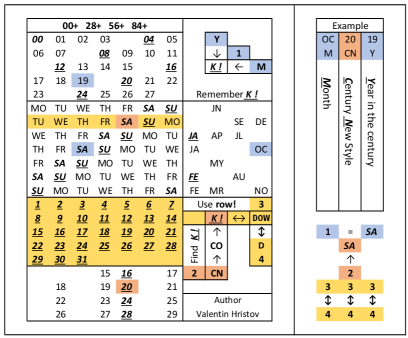
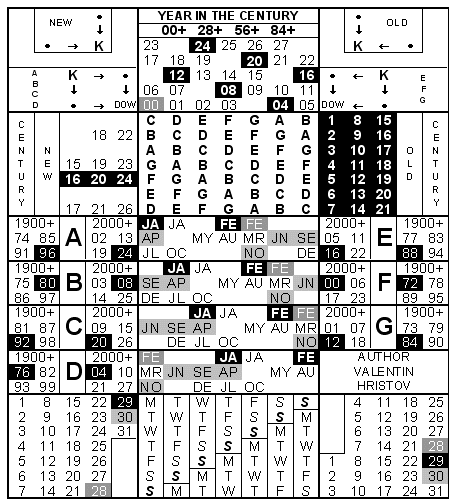
1. Find the Month letter (left up). Be careful if January and February are in leap or in common year!
2. Remember the row with the Year in the Century (right up). If needed add 28, 56, or 84!
3. Find the letter from step 1 in the row remembered in step 2 and remember its column!
4. Intersect the column remembered in step 3 with the row containing the Century digits
(down right) according to the Style (New or Old)!
5. At the crossing find the desired Day of Week for the First Date of the Month!
6. Finally, by rotation of the inner cylinder or cone find the suitable Month Calendar taking into account the Number of Days in the Month (31, 30, 29, or 28)!
NOTE: Years CC00 are leap in the New Style only if they are divisible by 400.
It is suitable to enlarge the conical print from A4 to A3 format.
(2024)
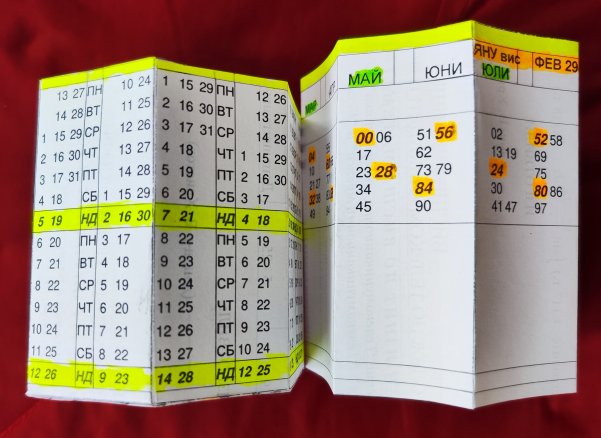
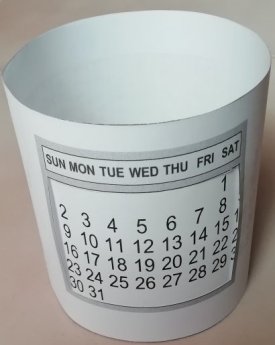
A Paper Cup prismatic perpetual calendar with separated months, 14 vertical dates, and Bob's idea for horizontal decades for the years.
The picture is of the Bulgarian Monday variant (PDF file).
You can download also the
English Sunday variant (PDF file) or the
English Monday variant (PDF file).
If your printer is B&W, use markers to indicate leap centuries and years.
The third person in our calendar group
Telmo
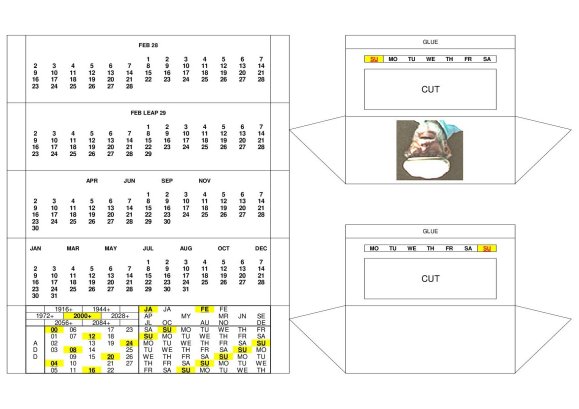
shared his "accordion" variant with separated months with 28-29-30-31 days:
Above you can see also my improved desk variant with the picture of the author. Added are more years (from 1916 to 2099).
You will be able to change the picture and to add some text in this Excel file.
In a newer (2024)
Excel
variant I added a second smaller "accordion" with a Perpetual table (including the centuries and a GRAPHICAL instruction) for Finding the Day of Week for the 1st date of the Month!
A detailed TEXT instruction can be seen above on this page after the (2024) picture of the Cylindrical and Conical variants of Perpetual Month Calendar.
In 2021 some difficulties appeared when I attempted to prepare conical
and circular variants.
For me this was somehow time consuming since in both
cases precise editing of circular text had to be done.
Therefore only a few examples are given for these types.
January + February + March combined - 2022 (common year)
First quarter for leap years is added and is visible on the left.
A table for finding "First of March Day of Week" (Tuesday in 2022) is hidden
on the inner part of this and the next calendar.
The whole year is presented!
An advantage is that the outer part contains only one Month Calendar visible from all sides.
The size of the fonts and the hight of the rows are variable - proportional to the radius.
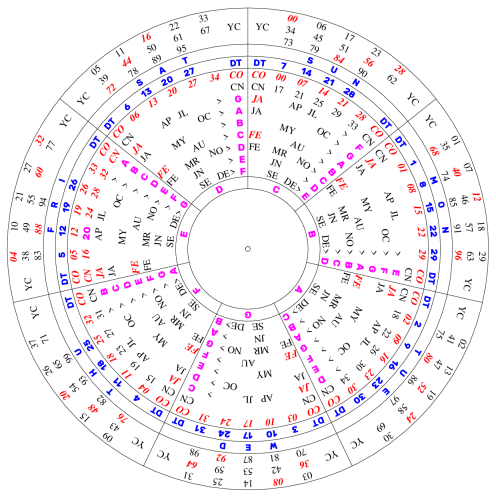
The two steps are hidden on the inner cone (see the PDF file above) and the aim is to find
"First of Month Day of Week".
First step is to remember the Key Letter at the crossing of the row with the Century - CO(ld) or CN(ew) -
and the Year in the century. For years 28-99 subtract 28,56, or 84 to have number between 00 and 27.
Second step is to find "First of Month Day of Week" at the crossing of the remembered Key Letter
and the Month.
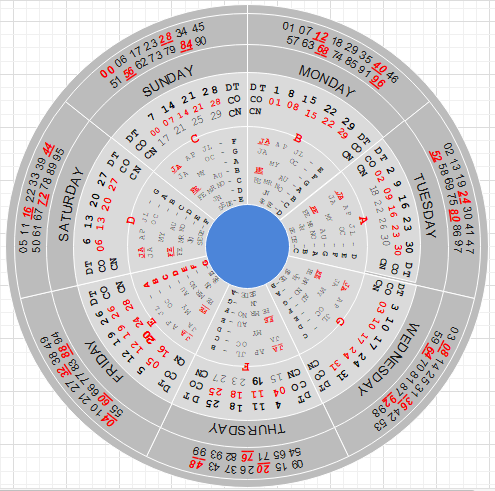
Align "Month <> Year". Add the existing years (00-27) to some of the indicated
initial years of the 28 years periods for 1900-2099.
For convenience one of the initial years is 2000.
Print twice, cut a smaller central circle between DW and DT, and rotate it
over the big circle.
In the sector with the Century - (CO)ld or (CN)ew style - remember the letter
corresponding to the month.
Align by rotation the remembered letter from the smallest inside ring with
the year in the century YC from the outside ring.
Similar calendar but with three circular parts has been patented by
Telmo Ghiorzi.
He was the person who challenged me to make the above variant with Only
Two Circular Parts.
Thank you, Telmo!
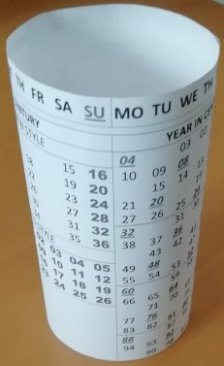
A cylindrical variant of this calendar as well as other cylindrical calendars
exist as separate
worksheets in the following Excel file.
First of all I am very thankful to
Bob Goddard!
Our colaboration with him proved to be very successful for constructing
Cylindrical Calendars.
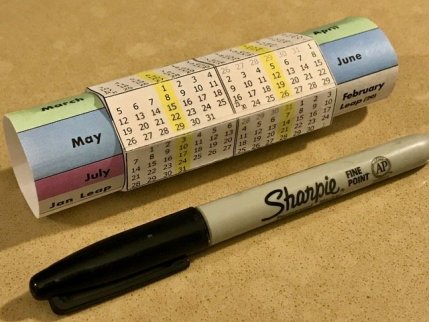
He produced recently a beautiful Calendar Pencil Cup (see it on
his page).
While preparing cylindrical calendars (Excel) I shared
and discussed them with Bob and Telmo.
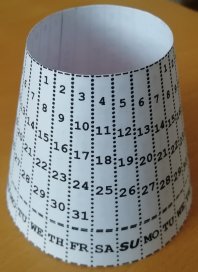
Among the many variants there are such with 7, 14, 21, or 28 columns,
but I include
in the Excel file
only a few of them.
An old example at the bottom of this page under "Miscellaneous" is my
Moon phase calendar.
The zip file contains
three PDF pages, instruction, and a
picture.
The outer and the middle cylinders serve as a Perpetual Cylindrical Calendar
with 28 columns.
Example of 28 columns cylindrical calendar is also
Bob's one.
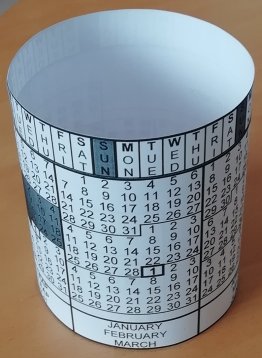
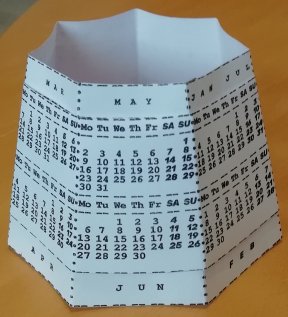
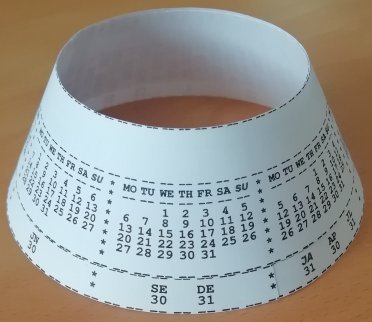
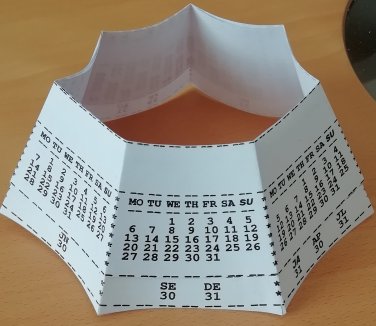
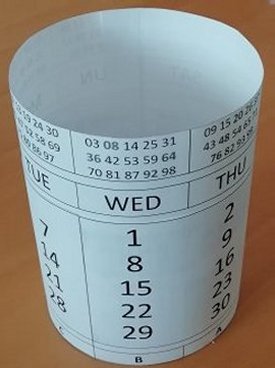
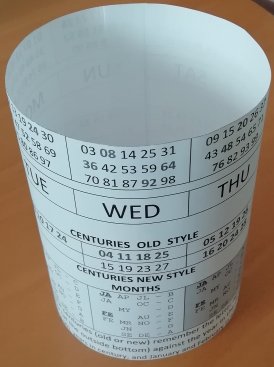
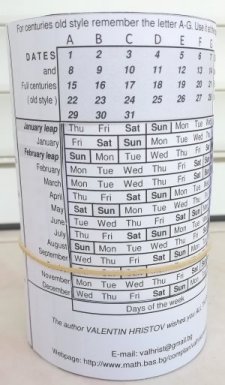
Here are the pictures of one of the variants in the new
Excel file above.
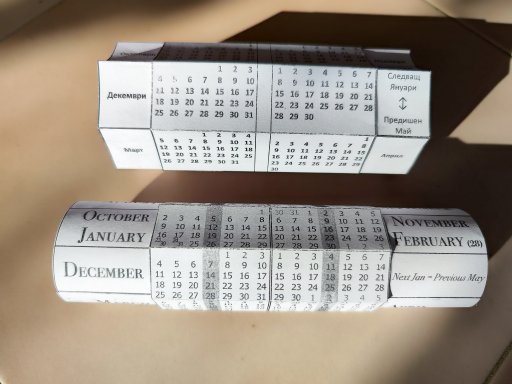
It is a cylindrical version with 7 columns of the circular calendar
with 7 sectors shown above.
Next pictures show another cylindrical calendar with 21 columns.
It has the advantage that the calendar is seen from all directions.
I also converted an old whole year perpetual flat
rectangular calendar to cylindrical and included it in the
Excel file above. ( PDF file )
For convenience the current month could be additionally indicated
by an elastic band as shown:
September 2021.
If someone is interested to share our hobby - calendar constructions - please,
contact one of us (Valentin, Bob, or Telmo).
(2020)
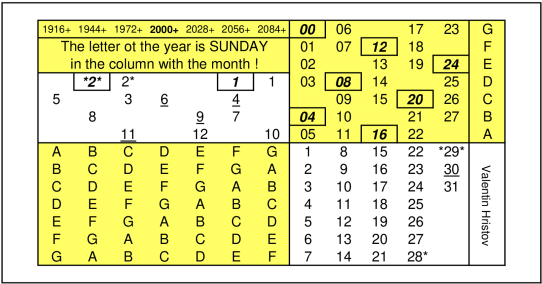
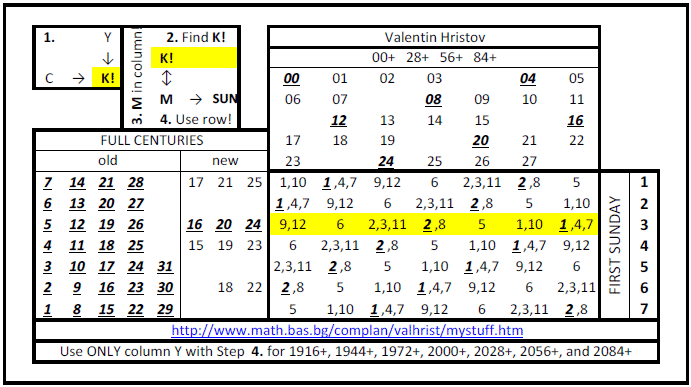
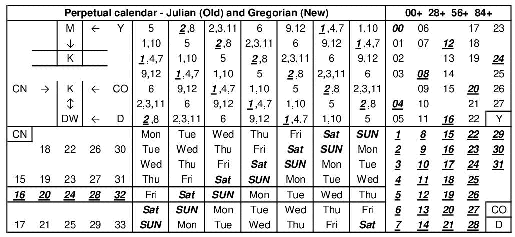
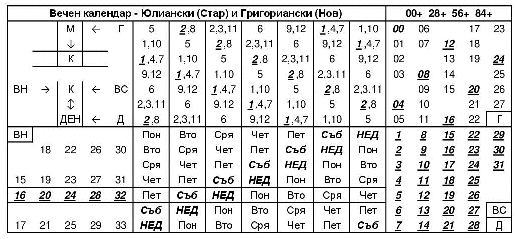
Minimized Perpetual Julian and Gregorian calendar with visual
instrctions and an example for October 2019.
Check that K!=FR
for January in the leap year 2024 and that the first row in the
middle part is valid - Year 2024 starts on Monday!
It is
convenient to mark the row for the current month by a paper clip on a
printed calendar.
Year 2020 is somehow "special".
There is no need to remember K! since the year in the centry is in
the same column as the full century new style and you can use directy
the rows containing the months! (Such years are also 1964, 1970,
1981, 1987, 1992, 2009, 2015, 2026, 2037, 2043, 2048, etc.)
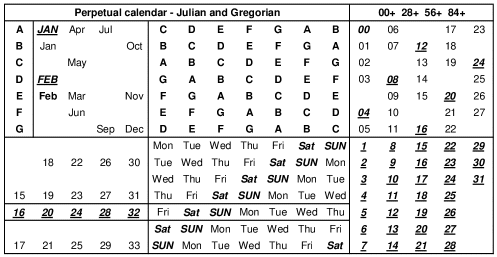
Next two calendars show ONLY SUNDAY (without days of week!):
Improved short and extended version of the previous calendar which includes additionally the centuries for
Julian and Gregorian calendar.
You can fold vertically and hide the centuries.
Table 1 (73
KB) or zip (13 KB) (Excel
format) Table 2 (28
KB) or zip (7 KB) (Excel
format)
Universal calendar: My initial (early 1970s) Text variant is seen below, but better looking variants are in
Excel,
or PDF,
or PNG,
or Plain TEX,
or DVI formats.
                      UNIVERSAL  CALENDAR
                  Valentin Hristov (Bulgaria)
                  E-mail:  valhrist@gmail.com
                  http://www.math.bas.bg/complan/valhrist/index.htm
                +-----------------------------+
                |       YEAR IN CENTURY       |  Initial transition
                +-----------------------------+  OLD STYLE   ->   NEW STYLE
                | 00? 01  02  03      04* 05  |  Oct 4, 1582 -> Oct 15, 1582
                | 06  07      08* 09  10  11  |  (Thursday)  -> (Friday)
                |     12* 13  14  15      16* |
                | 17  18  19      20* 21  22  |  In Bulgaria
   1. Intersect | 23      24* 25  26  27      |  OLD STYLE    ->  NEW STYLE
       YEAR IN  | 28* 29  30  31      32* 33  |  Mar 31, 1916 -> Apr 14, 1916
       CENTURY  | 34  35      36* 37  38  39  |  (Thursday)   -> (Friday)
    and MONTH ! |     40* 41  42  43      44* |
                | 45  46  47      48* 49  50  |
    Remember K! | 51      52* 53  54  55      |  2. In the row with the FULL
     (Key day!) | 56* 57  58  59      60* 61  |     CENTURY find the COLUMN
                |     68* 69  70  71      72* |     with the Key day K!
                | 73  74  75      76* 77  78  |
                | 79      80* 81  82  83      +---------------- ---------------+
                | 84* 85  86  87      88* 89  |          FULL CENTURY          |
  +-------------+ 90  91      92* 93  94  95  +---------------+----------------+
  |    MONTH    |     96* 97  98  99          |   OLD STYLE   |    NEW STYLE   |
  +-------------+-----------------------------+---------------+----------------+
  |     Jun     | Mon Tue Wed Thu Fri SAT|SUN|| 1  8 15 22 29 |                |
  | Dec Sep     | Tue Wed Thu Fri SAT|SUN|Mon | 2  9 16 23 30 |    18 22 26 30 |
  | Jul Apr JA* | Wed Thu Fri SAT|SUN|Mon Tue | 3 10 17 24 31 |                |
  | Oct     Jan | Thu Fri SAT|SUN|Mon Tue Wed | 4 11 18 25    | 15 19 23 27 31 |
  |     May     | Fri SAT|SUN|Mon Tue Wed Thu | 5 12 19 26+---+ 16*20*24*28*32*|
  | Aug     FE* | SAT|SUN|Mon Tue Wed Thu Fri | 6 13 20 27|All|                |
  | Nov Mar Feb ||SUN|Mon Tue Wed Thu Fri SAT | 7 14 21 28| * | 17 21 25 29 33 |
  +-------------+-----------------------------+-----------+---+----------------+
                |         DAY OF WEEK         | DATE IN MONTH |
                +-----------------------------+---------------+
                3. Use the remembered COLUMN with the DAYS
                   OF WEEK and the DATES IN MONTH to have a
                   MONTH CALENDAR !!!

  D E T A I L E D   I N S T R U C T I O N

  All steps use the central rectangle with the names of the days of the week.

  1. Intersect the horizontal row containing the month (left) and the vertical
   column containing the year in the century (above) to find the key day K!
   Remember K! just as a symbol to used in Step 2.
   (Be careful if the month is January or February. For leap years use JA* and FE*.
    See the Note: below.)
  2. Find the full centuries (right) in one of the rectangles in accordance
   with the style - OLD (JULIAN) or NEW (GREGORIAN).
   In the horizontal row with the centuries find the key day K! from Step 1.
   Remember the column (in the central rectangle) which contains K! for Step 3.
  3. The rectangle, used in Step 2 for old style centuries, is now used for
   the dates in the month.
   Together with the column remembered in Step 2 it gives the month calendar, so,
   to find the day of the week, intersect the horizontal row with the date
   in the month and the remembered column.

  Note: LEAP YEARS (denoted by *) in the old as well in the new style are those,
   which can be divided by 4 without remainder.
   EXCEPTIONS exist only in the NEW STYLE:
   EXACT CENTURIES (years ending 00), which cannot be devided by 400 without
   remainder, are NOT LEAP.
(2019)
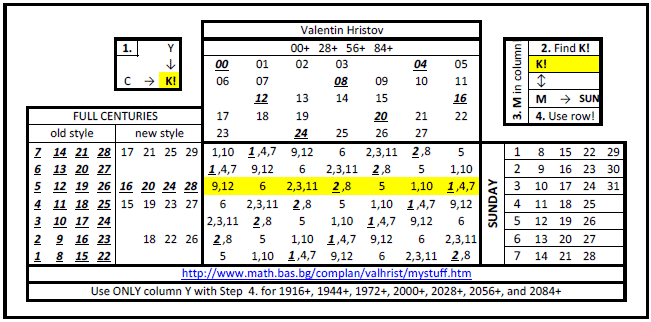
A compact variant of the above calendar.
1. Remember the
letter (A to G) to the left of the month. Find it in the row with the
year in the century. Remember the column! (Presented are only the
years from 00 to 27, but you can add 28, 56, or 84, to have any of
the other years from 28 to 99.)
2. The remembered column
contains the days of week and together with the dates (right down)
they give directly the month calendar for years between 2000 and
2099.
3. For other full centuries use left down part for
Gregorian style or right down part for Julian style. A Key day K! is
at the intersection of the remembered column with the boxed row (with
16,20,24,28,32 on the left).
In the row with the full century
(old or new style) the Key day K! determines the desired column with
days of week for the month calendar.
(2019)
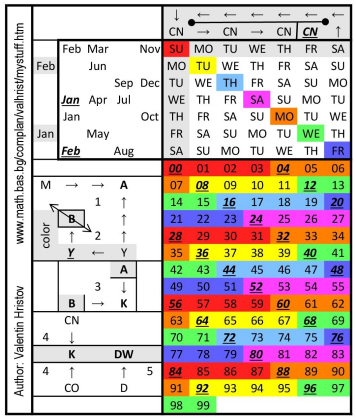
The same compact perpetual calendar with graphical instructions
(download Excel
variant with extended year range 00-99):
(2018)
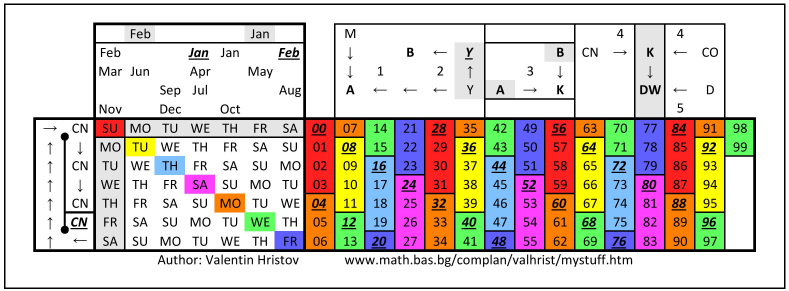
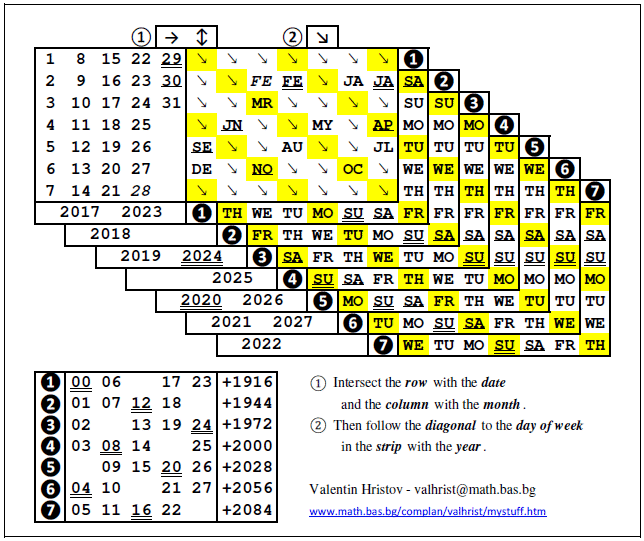
An "exotic" minimized variant of the previous
calendar (PDF). It is more
complicated in use since at one place are gathered the dates in the
month, the years in the century, and the full centuries old style.
This forces using colors and more steps which are not so obvious.
Therefore, if you need some help with the graphically presented
algorithm, please, contact me via the above e-mail addresses.
I made this calendar after I accidentally spotted a
similar
calendar at Al Stanger's page and I decided to improve it with
the possibility a whole month calendar to be seen at once instead of
finding the day of week for a single date only.
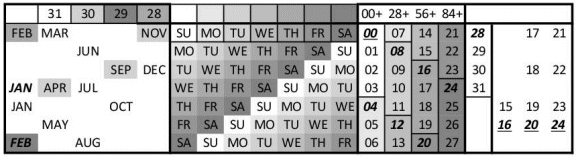
(2020)
Different levels of gray are used for this modified variant of the previous calendar
(suitable for printing on B&W printers). Here is the detailed instruction:
1. Start with the Reduced Year in the
Century (RYC=00 to 27 to the right of the central
square with the DOWs. i.e. for years bigger than 27, subtract
28, 56, or 84) (RYC is the remainder when the last
two digits of the year are divided by 28).
2. Intersect the row with RYC (right) with the
column with its RYCGray
color level (above) and
remember the new Gray color G1 (or the corresonding Key
day of week K1).
3. Intersect the row with the Month M
(left) (Be careful with JAN and FEB in
leap years !) with the column with G1 (K1)(above)
and remember a second Gray color G2 (or the
corresonding Key day of week K2).
4. Next the Full Centuries FC (first two digits of the year) are
involved in a different way:
For the new (Gregorian) style FCN use the
most right part of the table.(Note that exact centuries - ending 00 - are leap if they are divisible by 400).
For the old (Julian) style FCO use the
part with RYC
(FCO=RYC). (All exact centuries are leap)
In the row with FC
find the Column
with DOWs containing G2(K2).
Use it together with
the Dates (=RYC=FCO)
as the MONTH CALENDAR !!!
Cal_Year.zip (Plain TEX
format) - unzip in a separate directory. You can see
as PDF (convertion from DVI to PDF) the years
2025
and
1582
(when the change from Julian to Gregorian stile happend in October).
All possible year
tables on one folded sheet for your pocket (PDF-A4 variant as
PocketMod
design)(How to
fold). The week in it starts on Monday and each row contains 3
months. There is also a PDF-Letter
variant. The Excel
source contains all four variants without PocketMod on one sheet - 1)
the week could start on Sunday or Monday and 2) the rows could have 3
or 4 months. If you want to make a PocketMod booklet, you have to
prepare first a pre-PocketMod worksheet with 8 pages as the second
worksheet in the .xls file. Then use printing with some kind of PDF
creator to have a file like this
one. The final step is to use the PDF to PocketMod convertor to
produce only one A4 or Letter format sheet for cutting and folding.
(Note that to be able to run "PDFtoPocketMod.exe" you
need to download Microsoft
Net Framework !!!)
Using
"division by 5.6" with a calculator:
Here
some modifications of Al
Stanger's algorithms for finding the DayOfWeek are presented. You
can search on the archive
of a Calendar Mailing List (search "Al Stanger"). The
algorithms use only the first two decimal digits of "division by
5.6".
My favorite files for downloading: DAY
( DDAYYYY/5.6, see some explanations
and an easy way to memorize the key values), also a variant as
DAY-Box for pens.
(2012)
Simplified 4-years calendar tables - (Excel
variants - card size + 1912-2083 calendars)
The idea from the above tables is used for a suitably minimized
variant of a perpetual calendar - (Excel
variants - card size + full pages)
A combination of four years calendars for 2024-2051 plus
compact 1916-2083 calendar (
PDF variant for printing and Excel
variant for editing)
(December 2017) Unusual diagonal construction of a
calendar (Excel variants)
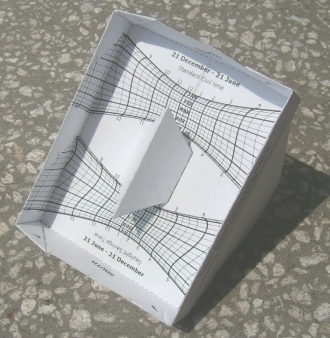
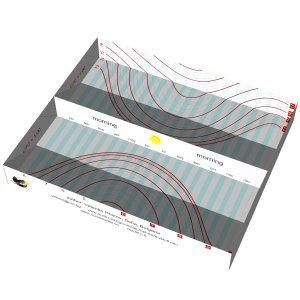
The most suitable inclination is 60 degrees. Then the projection of the sun rays from the pyramid top on the hidden square base is moved to the side face as an additional drawing and the face must be tilted to horizontal position.
For bigger inclinations, a suitable scaling draws a smaller square, since the top of the pyramid is closer to the side plane.
Fold both variants for the periods DEC-JUN and JUN-DEC. Then put the variant with the current month over the other one. This keeps the paper comparatively flat.
Visual instruction for small latitudes and almost local noon hours:
PYRAMIDS for places with BIGGER LATITUDES ONLY:
(Choose suitably the inclination!)
The files to the end of this section are written as macro files for
DeltaCad (CAD extension of BASIC). Unfortunately, it has been discontinued, but you can still download the program from this archive
One
of the active members of the Sundial Mailing List - Carl Sabanski -
put in November 2007 on his
web site a few pages with existing DeltaCad
macro files related to sundials written by different people and,
in particular, some of MY
MACRO FILES from this page. You will find screen shots,
instructions, comments and other useful information on these pages
and therefore I highly recommend visiting them !!! I am very grateful
to Carl for our fruitful joint work and for popularizing DeltaCad as
a suitable drawing tool for sundials !!! (Below "CS"
indicates links to pages on Carl Sabanski's site.)
Polar
Box Sundial (details
CS)
Box Sundial with
arbitrary orientation (read some instructions)
(details
CS)
Polar Nodus Box
Sundial - you have to print two dials (one for 21Dec-21Jun and
another for 21Jun-21Dec) (details
CS)
Polar Box
Sundial with gnomon - based on the previous dial, but the gnomon
allows to use it during the whole year (one of the ends is used as
nodus for 21Dec-21Jun and the other for 21Jun-21Dec, i.e. the
analemma is splitted) (details
CS)
In this picture the time is approximately 14:30 Daylight
Savings Time (DST) on 8 May in the upper part. In the lower part you
can see that the position of the sun will be the same at
approximately 14:40 DST on 5 August.
The size of the box is 66
x 81 x 16 mm when printed landscape on A4 paper. After folding it
becomes a rectangle with dimensions only 33 x 81 mm.
(February 2009) Double
Box Altitude Sundial Another modification of the Horizontal Box
Altitude Sundial (January 2008) with the edge of the middle wall
between two adjacent boxes as a gnomon.
(2012) The same sundial
was modified by Fabio Savian and was included in his
sundialatlas.net
- Gnomolab - Paper sundials - App 8 (use the slider).
App. 8.
Wee-Meng Lee from Singapore pointed out to an existing
origami
box construction which is applicable also to my box sundials. He also
put on his
page some of my sundials.
More
Sundials
In the end of 2006 I made a DeltaCad
macro with improvement of a design made by Wee-Meng Lee of a
Universal Ring Dial
(details
CS)
Now the hour scale can be adjusted for the Longitude
and the Equation of Time.
Classical
Bifilar Sundial with two perpendicular gnomons parallel to the
dial plate and with arbitrary position (test variant - December 2007)
(details
CS)
Bifilar
Sundial WITH ARBITRARY STRAIGHT GNOMONS AND DIAL PLANE (test
variant - December 2007) (details
CS)
Cylinder
Sundial (Type 1) with arbitrary position. A beam of light through
a hole at its surface gives the time inside the cylinder (January
2008) (details
CS)
Cylinder Sundial
(Type 2) with arbitrary position. A beam of light through a
concentric hole or a nodus point at its base gives the time. It can
be read from inside the cylinder or from outside (if the cylinder is
transparent). (September 2008) (details
CS)
(2009) Flag
Combo: Sun Compass and Sundial Allows to find first the
North-South direction and then to read the Local Time. Longitude and
EoT corrections are printed on it. You can download directly a PDF
file with instructions.
(2009) Polar
Half-Cylinder The Light-Shadow boundary indicates the Civil Time
and DST.
(June 2009)
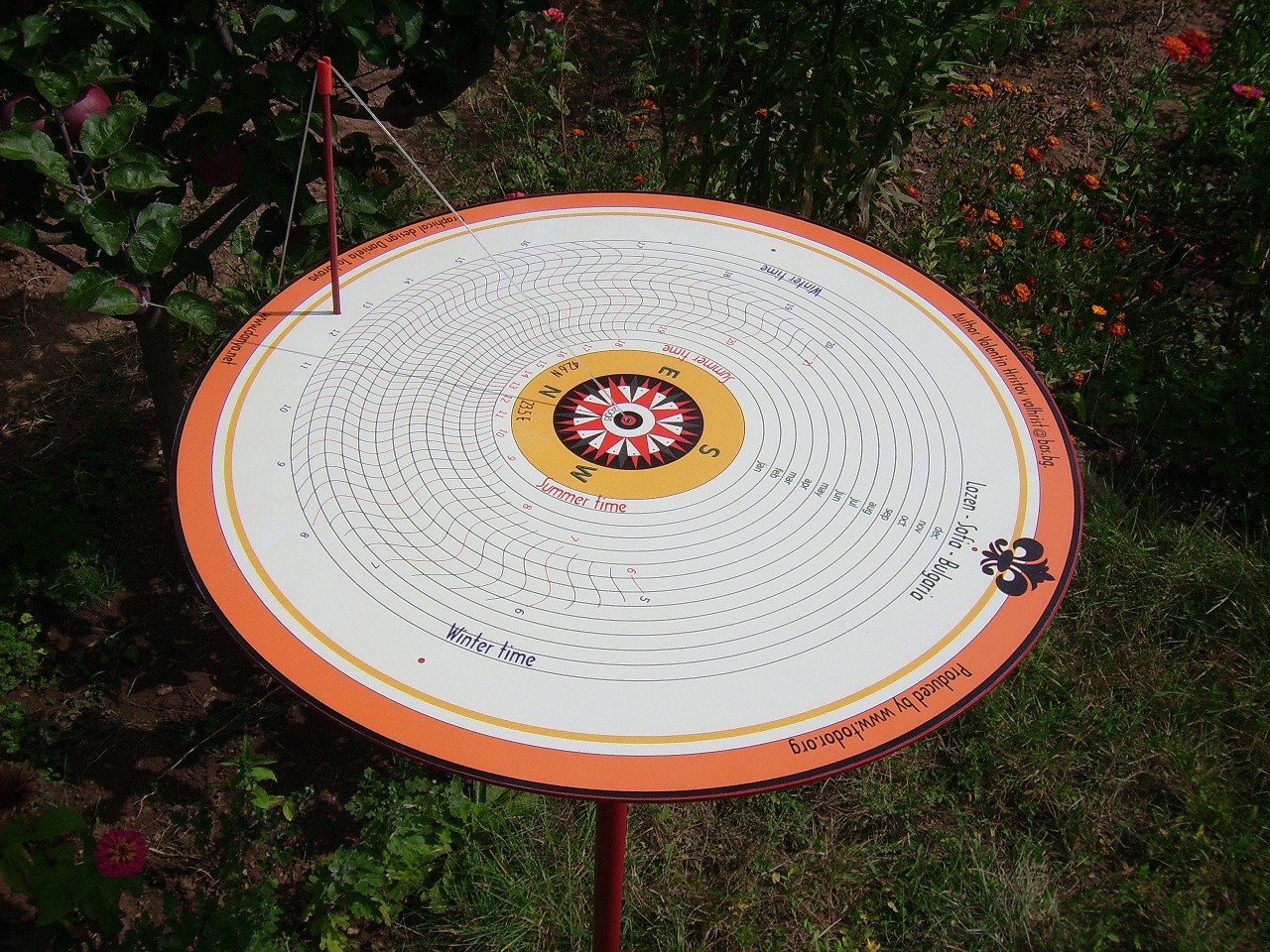
SUN POSITION - Represents HOUR and DATE vs. AZIMUTH and HEIGHT of the SUN.
IT CAN BE USED AS A COMPASS !!!
The edge of a tea box could serve as a vertical gnomon!
Only printing of two pages for both periods 21 DEC - 21 JUN and 21 JUN - 21 DEC is needed!
(August 2009) Star
and Sun Clock for the Northern Hemisphere - An essential
extension of my Star Clock (below) with the pozition of the sun among
the stars (the ecliptic).
(August 2009) StarSun.zip
contains the previous "Star and Sun Clock" and also a file
StarSunZ.bas with added drawings of the zodiacal constellations ("Z"
for Zodiac). The drawing resembles an astrolabe with "overhead"
view which is a standard for the star maps. Unzip all files in one
directory. Read the instruction for use and printing in the beginning
of the file.
(September 2009) Sundial
correction is a modification a Fer de Vries' macro. It shows the
total correction, i.e. the Equation of Time + the Longitude
correction in both Civil and Daylight Savings Time.
Some of MY EARLYER TEST VARIANTS for anaglyph, parallel, cross-eyed viewing, together with other combined examples are in a ZIP file for downloading.
Zoom suitably - IN or OUT - the files or the whole webpage !!!
In the beginning I used some freeware online sites for preparing the stereo photos like:
depthcreator - a Stereo Creator for parallel and cross variants
and then I used the bigger cross variant swapping left and right images in
3dthis - for an anaglyph picture like above.
Later I found that perhaps the BEST RESULTS for making different variants of stereo pictures gives
Stereo Photo Maker !!!
I personally prefer the CROSS-EYED method because of the greater resolution, the quality, the unchanged colors, and the possible lack of red-cyan glasses. (See an easy example with
Cross View Instruction!!!)
SHORT HINT: If you are having trouble to cross your eyes correctly, hold your index finger vertically between your eyes and the screen. Stare at your finger and slowly move it toward or away from your face until the background images snap together in 3D.
I decided to join ONLY the Facebook group
Magic Window X3D for cross viewing and you can see
MY CONTRIBUTIONS (Refresh the page!) there !!!
The picture below is from the Sofia Paper Fest 2026. The small white circles above the left and the right images will help you with the fitting!
Some EXELLENT EXAMPLES for VERY RICH and WELL ORGANIZED GALLERIES with different types of stereo pictures are
stereoimage.de and
hart3d.com
!!! (Choose the language and use left-right arrows for previous-next Image !!!)
 Picture from 2026
 (2026)



 (October 2022)
 January + February + March combined - 2022 (common year)
 January 2022
 December 2021
 December 2021
 September 2021
 October (letter B) 2021

 September 2021.



 Folding video (maximize!)


 Open the BIG CLEAR anaglyph variant of this picture (Use Ctrl-MouseWheel for resizing)
